A Practical Guide to Security for 2027
We’re a small team that ships with coding agents. What should we do about security this week, and this month?
Jack Cable’s A Practical Guide to Security in November 2026 is the best checklist of the season. Read it first.
This is our version, for a different reader: a team of 2 to 10 people who ship with coding agents. There’s no security team, and an agent can install a package, edit a workflow or touch a key faster than anyone reviews it.
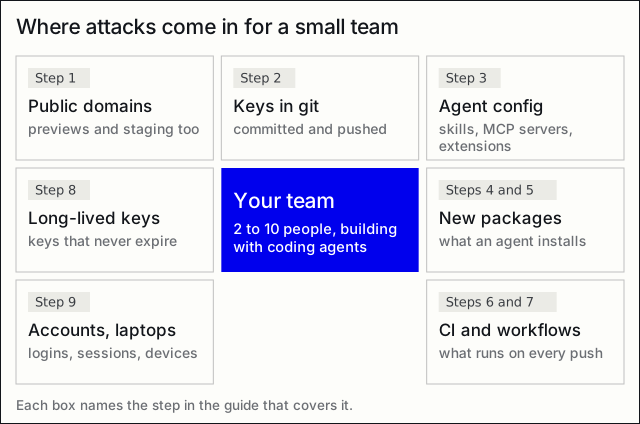
Ten steps: five for this week, five for the next 30 days. Each one says what to do, the command if Penthera can help, and where it can’t. Penthera is free, MIT and offline. A clean run means “nothing found in what it checked”, not “safe”.
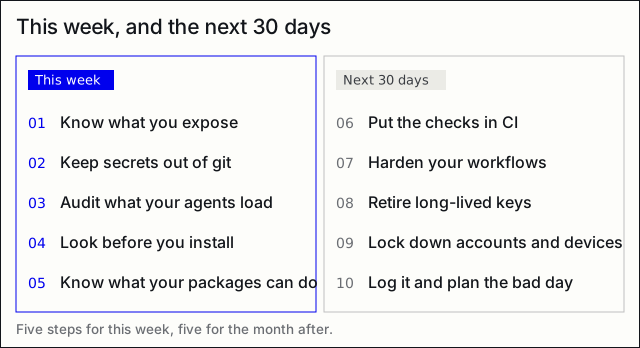
This week
1. Know what you expose
List your public domains, previews and staging included, and look at them the way a stranger would.
npx penthera@2.2.0 https://your-app.comOr ask your coding agent: Penthera’s MCP server has scan_url, which only reaches hosts you list. The checks are passive: TLS, headers, cookies, CORS, exposed files, OpenAPI. It sends no injection payloads.
Limit: it doesn’t log in, so it doesn’t test who can see what behind a login. Scan only domains you own.
2. Keep secrets out of git
Once a key is pushed, rotating it is the only fix. Stop it at the commit:
npx penthera@2.2.0 hook install
npx penthera@2.2.0 --repo .
The hook checks what you’re about to commit: secrets and AI provider keys, agent config, and new packages when the lockfile changes. The repo scan finds what’s already there.
Limit: it reads your repo, not your laptop. Keys in shell history, ~/.aws or a downloads folder are out of reach.
3. Audit what your agents load
Your agents run code too: skills, MCP servers, hooks, permissions, plugins, rule files.
npx penthera@2.2.0 agents
npx penthera@2.2.0 agents --pin
agents grades the setup A to F. --pin writes penthera.lock, so a skill or MCP server that changes later shows up on the next run.
Limit: editor extensions themselves aren’t covered yet. A trojanized Claude Code extension sat in Cursor’s marketplace in October (Cursor’s notice). Check extensions by hand and turn off auto-update where you can.
4. Look before you install
Agents add packages fast. Check a package before any of its code runs:
npx penthera@2.2.0 install some-packageIt resolves the new tree with scripts off and fetches without unpacking. It lists new install scripts and what the new packages can do, checks names for typosquats, and asks before running anything.
Add a delay too: pnpm can refuse versions younger than a set age (minimumReleaseAge, pnpm settings).
Limit: Penthera doesn’t check whether you’ve set a release-age delay.
5. Know what your packages can do
npx penthera@2.2.0 depsIt reads your installed packages and lists what each one can do (install scripts, shell, network, credential access), and which ones are new or gained a capability.
Limit: it doesn’t look up known vulnerabilities (CVEs), and every run says so. Use a CVE scanner next to it.
In the next 30 days
6. Put the checks in CI
npx penthera@2.2.0 initinit offers the hook and a GitHub workflow. The GitHub Action runs on pull requests. Make CI install from the lockfile (npm ci, not npm install).
Limit: Penthera doesn’t yet flag a CI step that installs without the lockfile.
7. Harden your workflows
Pin actions to a commit SHA, not a tag. Never let pull_request_target check out a pull request’s code. Never put a PR title or branch name straight into a run: script. GitHub’s guide covers all three: Security hardening for GitHub Actions.
Penthera: rules for these three patterns are in review for the next release. Until they ship, check by hand.
8. Retire long-lived keys
A key that never expires is a key that works for whoever finds it. Where your platform offers short-lived credentials through OIDC, use them. Vercel’s post Death to long-lived static credentials explains it and sets a deadline for its Marketplace vendors.
Limit: Penthera finds hardcoded keys in your code. It can’t rotate or replace them.
9. Lock down accounts and devices
This step isn’t Penthera’s, and it matters most:
- Passkeys or phishing-resistant MFA on GitHub, your cloud, your registry and your email.
- Sessions bound to the device. Device Bound Session Credentials (DBSC, a W3C draft, in Chrome) tie a login cookie to the machine, so a stolen cookie is worth less. Platforms are starting to build on it: Vercel’s post names DBSC among the standards for secure auth.
- A password manager, device management (MDM) and endpoint protection (EDR) on every laptop with production access.
Penthera: nothing here. Use your identity provider and your platform’s settings.
10. Log it, and plan the bad day
Keep logs you can read when something happens: who deployed, which token was used, from where. Write down who rotates which key, and how, before you need it.
Penthera: nothing here either. Your platform and cloud have the logs.
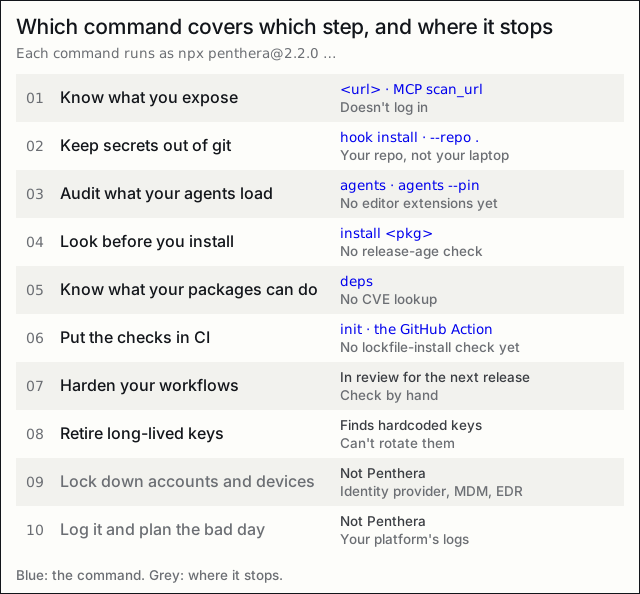
What this guide doesn’t cover
- Testing your login and access rules: who can see whose data. Penthera doesn’t log in.
- Your cloud’s settings, your network, your phones.
- Code review by a person or a model. Penthera’s rules decide its findings, and an AI review is a different, complementary check.
A clean result on any step means nothing was found in what was checked. It isn’t a promise.
One ask
Run the five “this week” steps on your own repo. If a finding is wrong, tell us with the “Wrong finding” form on GitHub. That’s how the rules get better.
github.com/danoszz/penthera, free, MIT, offline.
Sources: security-guide-2027.md.